Internet Explorer 10, how to disable the icon "show password"


The version of Internet Explorer 10 included in Windows 8 includes an option that, through the touch of an 'eye' icon, it shows clear passwords that you enter on Web sites The risk to privacy is enough remote but present, we see how to get rid and prevent malicious dell'occhietto who incidentally passes to our PC can see the password that you entered.


To disable the icon "show password" in Internet Explorer 10 you need to go in the 'Local Group Policy Editor. To do this, you must press the key combination Win+R to bring up the box "Run" and give the command gpedit.msc. To underline the fact that the Local Group Policy Editor is only available in Windows 8 Pro and above, not on Windows 8 "standard."

At this point, you have to use the side navigation bar to reach the following path: User Configuration>Administrative Templates> Windows Components>User Interface credentials and double click on the key do not see the button to reveal the password.

Finally, put the check Enabled, click Apply and OK and the eye icon will be disabled. To verify that they are stored the settings, restart Internet Explorer and try to login to any website In case you change your mind, to regain the ability to display the password you type in gpedit.msc just go back online, double-click on the key to display the button to reveal the password and put the check to Not Configured.

Note that applying the change to the User
Configuration setting affects only the user account used to extend the icon to disable all system users must use the Computer Configuration.


Start Menu Modifier, have the Start screen on the Desktop in Windows 8


Of programs for Windows 8 Start Screen dedicated to the new Microsoft operating system they are coming galore, some very interesting, others less so. Start Menu Modifier that allows you to connect desktop and Start screen of Windows 8 in a nice and original. Using Start Menu Modifier you get a sort of split screen in above or below the Desktop of Windows 8 (depending on your preferences) you can display the Start Screen with all its live tiles. In this way, it becomes possible to start programs, search for files
and do other things in the Start screen without leaving the Desktop.

A solution "intermediate" which we believe is perfect for those who are still loyal to the Start menu in Windows 7 but they are doing
everything possible to settle the interface Metro.

The application takes in effect replaces the Start Screen in full screen and you can recall not only through the hot corner in the bottom left but also by Chamrs Bar and customizable keyboard shortcuts.

You can set all the main program window, which should be performed with administrator privileges ignoring the advice of the SmartScreen Filter. In short, all you need to do to get this Start Screen in half Desktop Windows 8 launch Start Menu Modifier, choose to have the bar with the Start screen up or down using the appropriate drop-down
list and click the OK button. There is also the option to start the program automatically when Windows starts and boxes to set keyboard shortcuts, as I mentioned before.

If you are interested in the program, the download link is below. Of course, all free and no-install. We we tested it successfully on Windows 8 RTM 64-bit.

DOWNLOAD | Start Menu Modifier


The record for download beta IE9


Steve "Pleased to meet me," Ballmer has dropped by Seattle in PDC occasion, an event important that developers uniteProfessional, Microsoft group courts in particular. And besides pens, stickers and some flash Other propaganda has also Remond giant brings good news.

internet explorer, IE9 beta


Welcoming the addition to the implementation and operation of Windows 7, Azure, also take the time to present The next evolution of beta Internet 9, Explorer Platform Preview 6, so it fills commitment to update the version previously different browsers six each weeks.

After providing encouraging data on weekly level in I9 beta, with about ten million, then a demonstration of several new features, such as acceleration HTML5 and hardware for new system by which we can move the application that to your desktop from the browser and vice versa. Microsoft, which uses IE version of Homer Simpson and donuts, like recover lost Firefox and large space Chrome grow.


4 New Internet Philosophy Explorer 9


4 New Internet Philosophy Explorer 9

Internet Explorer 9 (IE9) ready for beta testing by the public. Just like a product new, Microsoft is introducing four philosophy in her new browser.

Here is the fourth such philosophy:

1. Speed
IE9 a browser that utilizes powerful Graphical Processing Unit (GPU). Besides these browsers also have taken advantage of multi-core CPUs for better JavaScript maximum.

2. Net
Unlike previous versions of the full with the option, the display is now more clean IE9. This because the columns are parallel to the URL browser tabs. In addition, a notification IE9 newly emerging at the bottom of your browser with a more orderly.

3. Trustworthy
IE9 present presents new download manager Smart Screen Protection. Technology This helps the user in Microsoft filter foreign sites that sometimes rode malware. Not only that, IE9 now has an add-on protection performance can be added itself by the user.

4. Interoperability
Standardization related web pages, have also IE9 ready with full support for standard HTML5 and support for open web fonts format. With this Web designers can more be creative in his work.


In general, more or less naturally appear IE9 with more smooth when opening sites with support for HTML5. This is all because of the GPU have maximized their potential in the computer by this browser to get more speed maximum.

For users who have tried IE9, some HTML5 based sites below may be a comparison. Please compare with some other browsers like Opera Firefox and Chrome.

http://www.thekillersmusic.com/html5
http://html5.labs.ap.org/
http://www.webvizbench.com/


Add-on that slow the browser Internet Explorer 8


This fact is the Internet Explorer 8 browser used by Internet users across the world, but IE8 such as Firefox, Chrome, Safari or Opera have the worst of what The best and other competing browsers, it is clear that both higher losses.

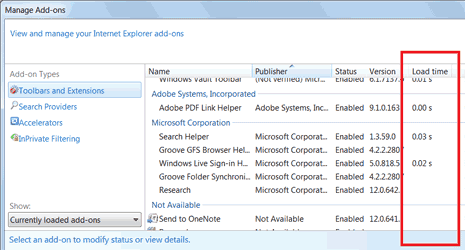
The advantage is that the browser applying a very interesting feature, slowly add the ability to determine loading a web page with Internet Explorer 8.

Indeed, in Internet Explorer 8 has been included column with the load times of measurment components different. Highlighting that every time use each time you add open tabs.

To obtain this information go to Tools -Manage Add-ons. We can sort of time loads extension. If there is an obvious add-on can slow the loading time disable or uninstall it, so that Internet Explorer 8
you more quickly
.

Add-on that slow the browser Internet Explorer 8, time loads extension


5 ways to speed up Internet Explorer 8


Internet Expplorer 8 is a browser that The most successful of which was made by Microsoft, but the performance but can be more improved.
Today we mark the five ways to speed up Internet Explorer 8 browser.

Eliminate unnecessary extensions
Many programs, once installed, adds own or other toolbar add-on Internet Explorer 8.
Very often this extension is very slow browser and can also cause accidents, so it is recommended to eliminate unnecessary.
do this, simply click on the Tools menu and To select Manage Add-Ons.

5 ways to speed up Internet<br />Explorer 8_1


This way you open a window of where you can disable extensions different.


Cache configuration
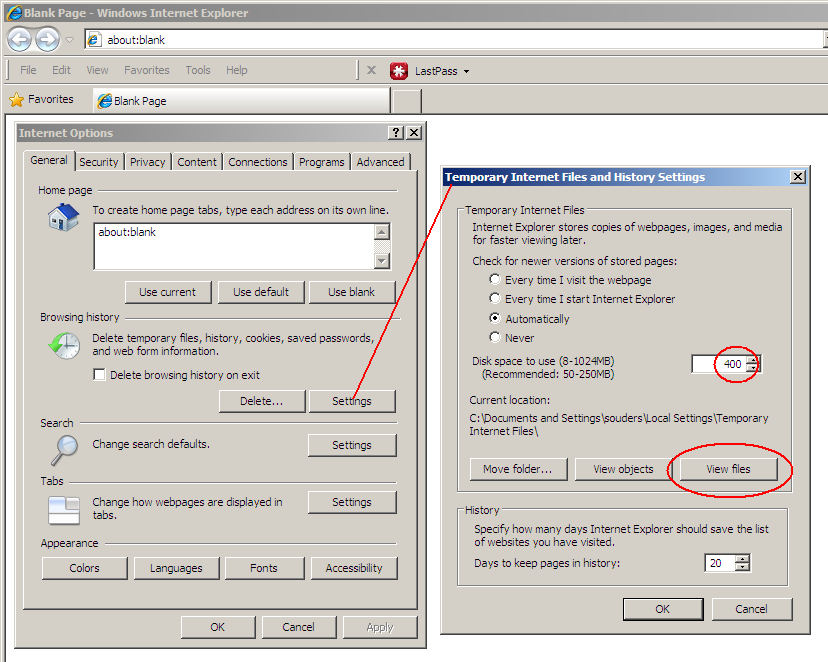
To configure the cache in Internet Explorer you must click on Tools and select Internet Options.
Thus opens a new window, click Settings in the History of preferred access Browsing to the cache.
It is important to ensure that the cache stored on disks with more performance efficient ', if you have multiple hard drives in your home.

5 ways to speed up Internet<br />Explorer 8_2


A new version control
In some cases, Internet Explorer is set to check the availability of new versions of a website, an operation which is very slow browsing.
To access this option you must click on the Tools and select Internet Options.
Thus opens a new windows, click Settings in the History of preferred access Browsing.
In the Temporary Internet files, search new versions of stored pages to be set to Auto.

5 ways to speed up Internet<br />Explorer 8_3


Enable download more files are same
To increase the maximum file downloaded from the Internet simultaneously Explorer to open the Registry Editor and enter this key:

HKEY_CURRENT_USERSoftwareMicrosoftWindows
CurrentVersionInternet Settings
.
Then you have to change the value of diligence and MaxConnectionsPer1_0ServerMaxConnections arrangement 10.

Empty the cache
Sometimes, you need to vacate cache of Internet Explorer 8.
This may in fact may be damaged, caused a decrease in shipping.


The first official graphic image Internet Explorer 9


The first official graphic image Internet Explorer 9

What you see above is the official image The first of the graphical interface of the browser version
New from Microsoft Internet Explorer or 9.

It was found from Microsoft (Russia) and removed immediately, but as you know well, it does not pass the network.
Until now all the preview version of This browser is not yet available showing graphical interface that is true, and then
everything is still dark in the eyes of the user.

As you can see, the new design
introduced in IE 9 is very good, although very similar to Firefox. Next various keys - and right back home - Library - (choice?) Is the bar tab with The next renovation address bar.

As for the Mozilla browsers, including IE 9 I think we can continue with the level graphic customization can move
buttons and other interface elements.

Now is not far to the 15th of September, when we will release the first official beta version of
Microsoft when we can finally see
the new interface and many features added and tested all the progress that Redmond has been created by people.


Sundries article Copyright © 2010 LKart Theme is Designed by Mobile